 Withdraw a workflow
1.Before a workflow is completed, the issuer can
withdraw the workflow.
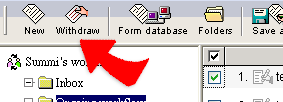
2. When a workflow is withdrawn, the workflow will be back in the Inbox of the issuer. Issuer can delete the workflow or edit the workflow for re-issue.
3. If a workflow is withdrawn by issuer, then system will notice all persons who have signed the workflow by mail automatically.