 功能按鍵說明
1.The top left corner, there are some icons used for managing your files.:
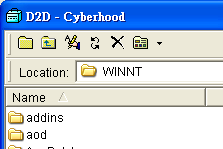
1) Add New File:To add new files.
2) Edit File Name:To change the file's name or directory's name.
3) Up:Return to the previous page.
4) Refresh:Refresh all files.
5) Delete:Delete selected file/directory.
6) view:provide large icons,small icons, list, detail and thumbnails.
2. The icons on the top right corner allows you to manage your file on
the right:
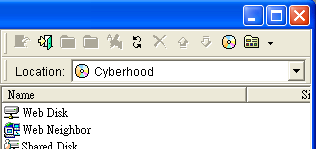
1) Login :login
to D2D。
:login
to D2D。
2)Log out : log out of D2D。
3) Add new :Add
new file/dicrectory。
:Add
new file/dicrectory。
4) Up :Return
to the previous page.
:Return
to the previous page.
5) Change : To
change the name of a file/directory.
: To
change the name of a file/directory.
6) Refresh :Refresh
file/directory
:Refresh
file/directory
7) Delete :Delete
selected file/directory.
:Delete
selected file/directory.
8) Upload :Upload
file.
:Upload
file.
9) Download :Download
file.
:Download
file.
10) Go to Cyberhood :open
Cyberhood web page.
:open
Cyberhood web page.
11) View :Provide
detailed and thumbnail views of a file/directory.
:Provide
detailed and thumbnail views of a file/directory.