 Choose Bulletin Posting Date
1. When adding new bulletins, users can choose which date a new bulletin will be posted.
2. Within the compose new bulletin window, Click on "Choose Bulletin Posting Date",then set the date which you will like the new bulletin to be posted.
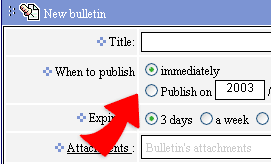
3. As you finish composing the new bulletin, this bulletin will be saved into a file that contains all the bulletins to be posted until the date set. Then the bulletin will be posted.
4. By clicking on the  --
you can enter those new bulletins, which are waiting to be posted and
change or delete new bulletins.
--
you can enter those new bulletins, which are waiting to be posted and
change or delete new bulletins.
|