 Using Bulletin's Attachments
1. 1. Attachment files within bulletin postings can be viewed be simply clicking on the file, it can also be downloaded as well as be saved into you desk drive.
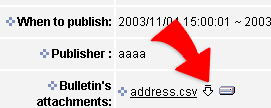
2. Click on the file name to open and view attachments.
3. Click on the  that is located on the right hand side of the attachment file name to download file into your own computer.
4. Click on the  that is located on the right hand side of the attachment, another window will pop up. Select the location where you will like an attachment file to be saved in your own hard drive.