 Set Alarm Clock
1. While adding a new event, you can choose to set an alarm clock to remind yourself.
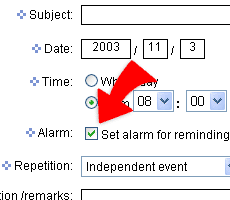
2. On the page of adding new events, select "Set Alarm For Reminding" and the functions of setting an alarm will show up on the right.
3. Select and set the time that you want, then click "submit" the alarm clock will be sat right away.
4. When it is the time that u asked the alarm to remind you, a small window will pop up and play music.
|