 Changing other member's password.
1. Click on contact's name and a basic profile will appear.
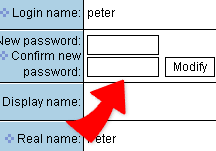
2. To change password, enter the password into the new password field directly. Click on "Change". Password is now changed.
|
|
Changing other member's password. |
||
1. Click on contact's name and a basic profile will appear. 2. To change password, enter the password into the new password field directly. Click on "Change". Password is now changed.
|