 Suspending
Internet Hard-Disk Sharing Area.
Suspending
Internet Hard-Disk Sharing Area. 1. Click on "Public Sharing Area Management" and enter into "Public Sharing Management- Step 1" .

2. Select "Public Sharing Area Setting/Management " ,,and select a name from the drop down list and click on "Next" and enter into "Public Sharing Area management- Step 2" .
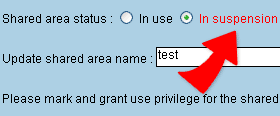
3. Inside the Public Sharing Area Current State, select "停用中Suspended" ,, and click on "Finish" to complete the setting.