 Attachments as a link sent out with mail
1. Click  --Write mail. The write mail window opens for your writing mail.
2. In [The way to send files] field, check [Send as link ]。
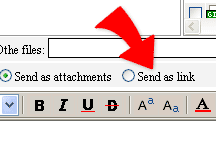
3. The attachments will be sent out as a link with the mail when you click Send mail. The link will show as "sender name's WebHD". Click it and you can look up the attachments and decide which you want to get and download.
|