 keep a copy when automatically forwarding
1. Click  --Auto forward. The page turns to "Automatical forwarding" page.
2. Check [Forward, and keep a copy]。
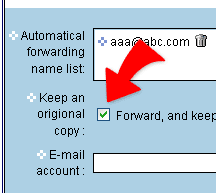
3. Then click "Done" to complete setting.
|
| keep a copy when automatically forwarding |
||
1. Click 2. Check [Forward, and keep a copy]。
3. Then click "Done" to complete setting.
|