 Write a mail- Send mail
1. Click  --Write mail. The write mail window opens for your writing mail.
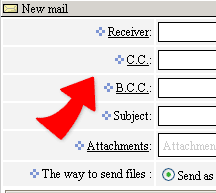
2. In Receiver, CC, BCC fields, fill in
the email addresses you want send them th mail. Or click the titles of
the 3 fields to choose mail addresses from address book.(support mail format: user@[210.66.81.48])
3. Fill the Subject and the mail content. The HTML editor will help you to complete the mail content.
4. Click  --Send mail. The mail is sent out.