 Network
neighborhood list
Network
neighborhood list1. The directory area shows on the left frame of the WebHD. In the area, you can find [Network neighborhood]。
2. Click +  Network neighborhood, a name list shows below of the area. Each name means the associated person who shares some files to you. In other words, if no one shares files to you, the name list will be empty.
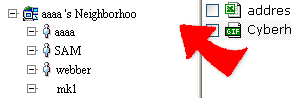
3. Click a name, the associated shared files to you are listed on the right frame of the window.
4. Access the shared files by downloading directly or copy them to your own WebHD for further use.
|