 Setting the first page after log in
1. Enter 「Basic Setting」you then can select which page you want the window to stop at after you log in.
2. Select from the drop down list.Follow by clicking on 「Done」。
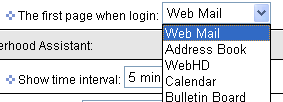
3. The next time you log in, your homepage will be the one you have selected.